WordPress Development
& Demo Platform
Two tools in one. A full local development environment and a demo hosting platform for agencies. Docker-based, multi-PHP, multi-DB, zero config.
Two Modes, One Platform
Choose the mode that fits your workflow. Same codebase, different superpowers.
WordPress Development Environment
A full-featured local dev tool. Like Local by Flywheel or Laragon, but Docker-based with multi-PHP and multi-DB support.
- Choose PHP 7.4, 8.1, 8.2 or 8.3 per site
- MySQL, MariaDB, or SQLite per site
- Custom subdomains at
*.localhost - Persistent data via Docker volumes
- No auth, no limits, no restrictions
- Global
wplCLI command - WP-CLI access to every site
- Built-in Mailpit email testing
- 2-Way Sync
- Adminer - Database management
bash install-local.shDemo Hosting Platform
Spin up temporary WordPress demo sites pre-loaded with your plugins and themes. Auto-expiring, sandboxed, production-ready.
- Role-based admin with email/password login
- Per-user site limits & rate limiting
- Auto-expiring sites with countdown
- Sandboxed: capability restrictions, file locks
- Multi-product support with branding
- Wildcard SSL via Traefik + Let's Encrypt
- Admin dashboard with 10 management tabs
- Bulk launch up to 50 sites at once
- Customizable branding & color palettes
- Security hardened: httpOnly cookies, per-container salts
curl -sSL https://wplauncher.msrbuilds.com/install.sh | bashYour Personal WordPress Dev Environment
A full-featured local development tool. Spin up isolated WordPress sites in seconds with your choice of PHP version, database engine, and pre-installed plugins.
- Choose PHP 7.4, 8.1, 8.2 or 8.3 per site
- MySQL, MariaDB, or SQLite per site
- 2-Way Sync with remote WordPress
- Built-in Mailpit, Adminer & WP-CLI
- Templates, snapshots & site cloning
- Productivity monitoring & time tracking
bash install-local.sh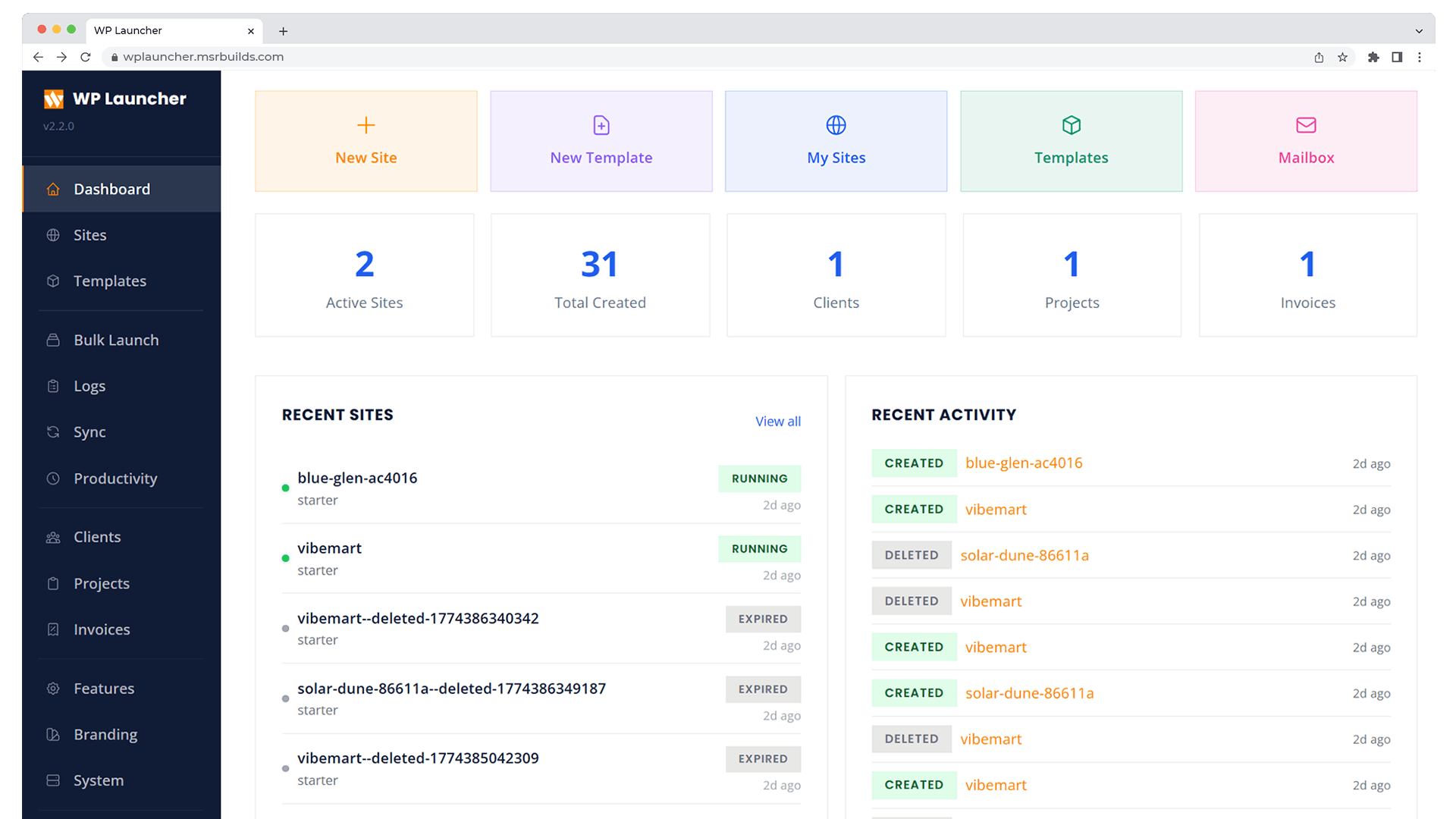
Production Demo Hosting Platform
Deploy on any VPS and let clients launch sandboxed WordPress demos pre-loaded with your plugins and themes. Auto-expiring, SSL-ready, fully managed.
- Role-based admin with full dashboard
- Auto-expiring sites with countdown
- Real-time server monitoring & analytics
- Multi-product support with custom branding
- Wildcard SSL via Traefik + Let's Encrypt
- Bulk launch up to 50 sites at once
curl -sSL https://wplauncher.msrbuilds.com/install.sh | bash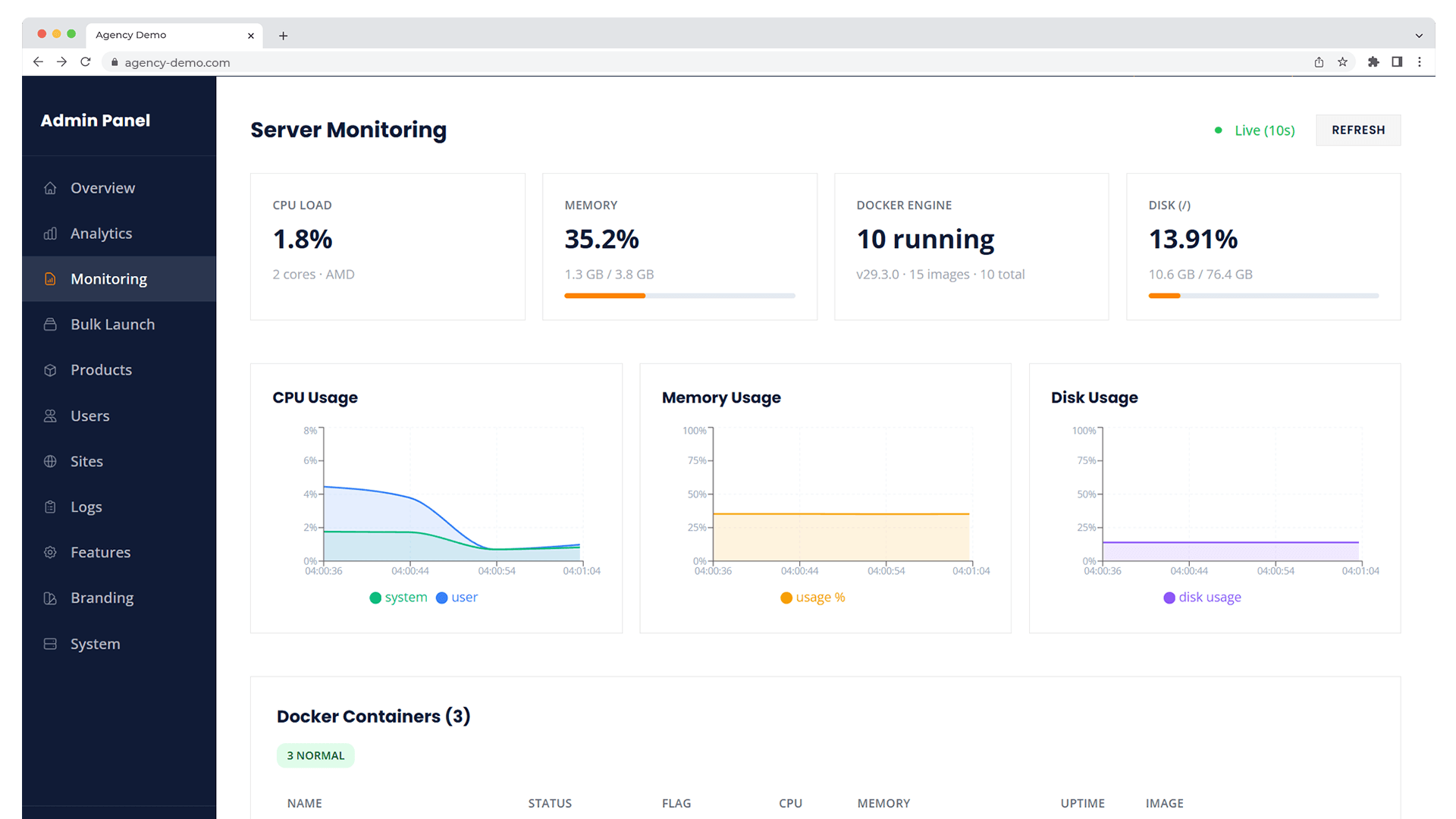
Everything You Need, Built In
Every feature works across both modes — local dev and agency hosting — out of the box.
Instant Provisioning
Sites launch in ~10 seconds from pre-built Docker images with plugins, themes, and demo content baked in.
3 Database Engines
SQLite for speed, MySQL 8.4 or MariaDB 11 for production parity. Choose per site at creation time.
Multi-PHP
PHP 7.4, 8.1, 8.2 or 8.3 selectable per site. Build images for PHP 7.4 and 8.1–8.5 from the panel, no command line needed.
Product Templates
Define reusable configs with specific plugins, themes, branding, and restrictions. Launch any template with one click.
Full Isolation
Each site runs in its own Docker container with memory/CPU limits. MySQL/MariaDB sites get their own database and user on a shared server.
One-Click Login
Auto-login tokens let you jump straight into WordPress admin. No passwords to remember or share.
Built-in Email Testing
Mailpit catches all outgoing emails locally. Test contact forms, WooCommerce emails, and notifications at localhost:8025.
Wildcard Subdomains
Each site gets a unique URL like coral-sunset-7x3k.localhost. Works in Chrome, Firefox, Edge — no hosts file needed.
Mini CRM & Client Portal
Manage clients, project boards, and invoices. Clients sign in to their own portal to see progress, upload payment proofs, and message you.
Site Sync
Push and pull site content between local and any remote WordPress site. Includes a connector plugin with automatic URL replacement.
Branding & Theming
Customize logo, site title, card layout, and choose from 10 color palette presets.
Productivity Monitor
WakaTime-like time tracking for coding and WordPress activity. VS Code extension + auto-tracking MU-plugin with cloud sync.
The wpl CLI
A global command installed automatically. Manage everything from your terminal.
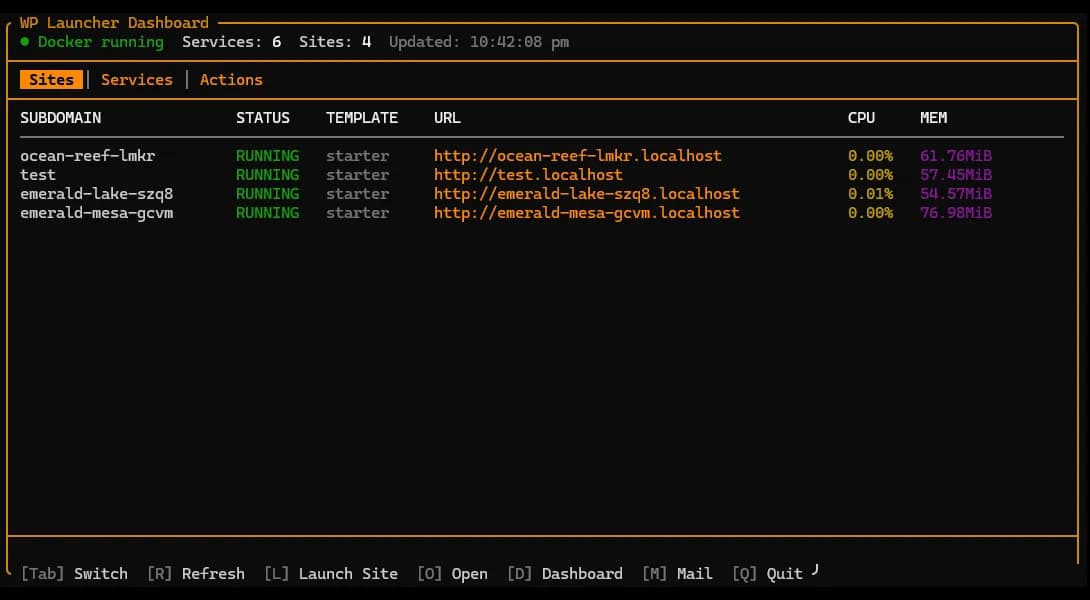
Interactive Dashboard
Run wpl to launch a rich terminal dashboard. View all your sites, their status, URLs, and database engines at a glance.
Service Monitor
See all Docker services — API, Provisioner, Traefik, Mailpit — with real-time status, port mappings, and health indicators.
Full WP-CLI Integration
Run any WP-CLI command inside any site with wpl wp <subdomain> .... Install plugins, export databases, manage users.
Architecture
Microservices running via Docker Compose. Production-ready out of the box.
Core business logic, auth, site orchestration, rate limiting
Low-level Docker container and image management
User-facing SPA for launching and managing sites
Auto-discovery, wildcard routing, Let's Encrypt SSL
Pre-built images with WP-CLI, plugins, and MU-plugins
Catches all outgoing emails locally for testing
Built For
Whether you're building plugins, running an agency, or just need a dev environment.
Local WordPress Development
Replace Local, Laragon, or MAMP. Launch isolated WordPress instances with any database engine, PHP version, and plugin combo.
Plugin & Theme Demos
Let potential customers try your product instantly. Pre-install your plugin with demo content and custom branding.
Agencies & Freelancers
Spin up client preview sites on demand. Show off designs in a real WordPress environment. Sites auto-expire when the project wraps up.
Training & Workshops
Give each student their own WordPress site for hands-on workshops. Sites auto-clean after the session.
What's New
Recent releases and improvements.
Strong Default Passwords
- New sites get a random 20-character admin password instead of admin/admin
- Generate and copy buttons on the site creation form
- Create Another draws a fresh password, so sites never share one
Mini CRM & Client Portal
- Mini CRM: clients, project Kanban boards, invoices, payment methods, and payment proofs
- Client portal (opt-in) where clients see their projects and invoices and message you
- Shared MySQL/MariaDB servers: about 1.2 GB down to 0.45 GB on a four-site host
- Dokploy: self-contained TLS, per-site isolation, and Adminer behind a login
Blueprint Editing
- Every blueprint now has an Edit action; the ID is locked while editing
- Card image and icon survive a save, and changes apply to new launches
- Full blueprint details (Docker config, plugin lists) now require an admin
Blueprint Restrictions Fix
- Restriction toggles (file mods, capabilities, hidden menus) now apply to launched sites
- 7 toggles expand to 12 capabilities in coherent groups
- A missing restrictions setting fails closed to the full lockdown
Get Started in Minutes
Pick your mode and follow the install steps. Both need Docker installed.
Local Mode
For WordPress development on your machine.
Builds the PHP 8.3 image, installs the wpl CLI, starts services, and opens http://localhost.
Agency Mode (VPS)
For hosting demos on a public server.
Installs Docker, prompts for domain, SMTP, and admin credentials, configures Traefik with SSL, creates your admin account, and starts everything.